OpenClaw使用体验
作者:数据人阿多 日期:2026年3月13日
小编体验结论
- 配置有点复杂
- 太消耗 tokens
- 不同模型的使用效果有差异
下面分别就以上几点体验进行详细阐述,网上现在已经有大量的安装教程,小编这里不再赘述
小编环境
- Windows11
- WSL2 Ubuntu-24.04
- OpenClaw 官方安装,安装文档:https://docs.openclaw.ai/zh-CN/install
配置有点复杂
OpenClaw 大家可以把它当做一个 软件 或者 智能系统 使用,遇到什么问题,那大概率就是配置有问题
国内用户习惯界面UI开关按钮,进行软件控制,但OpenClaw有的配置界面配置太麻烦
配置可以从多个途径进行修改:
-
提供详细的提示词,让智能体自己去修改-----容易自己把自己修改废了
-
在 WebUI中修改配置,可以理解为管理后台-----在保存配置时,OpenClaw会备份之前的配置
-
命令行进行修改,命令有点复杂
-
直接修改配置文件-----修改完需要重启网关
小编这里是WSL2中安装的OpenClaw,对应的文件是
\\wsl.localhost\Ubuntu-24.04\home\datashare\.openclaw\openclaw.json
小编的一些配置,供大家参考:
模型配置
其中 DeepSeek 的模型,OpenClaw配置模型选项中没有,所以需要自己配置
小编体验了不同平台的模型,所以列出的模型配置有点多
"models": {
    "mode": "merge",
    "providers": {
      "deepseek": {
        "baseUrl": "https://api.deepseek.com/v1",
        "apiKey": "xxx",
        "api": "openai-completions",
        "models": [
          {
            "id": "deepseek-chat",
            "name": "DeepSeek Chat (V3)"
          },
          {
            "id": "deepseek-reasoner",
            "name": "DeepSeek Reasoner (R1)"
          }
        ]
      },
      "bailian": {
        "baseUrl": "https://dashscope.aliyuncs.com/compatible-mode/v1",
        "apiKey": "xxx",
        "api": "openai-completions",
        "models": [
          {
            "id": "qwen3.5-plus",
            "name": "qwen3.5-plus",
            "api": "openai-completions",
            "reasoning": false,
            "input": [
              "text",
              "image"
            ],
            "cost": {
              "input": 0,
              "output": 0,
              "cacheRead": 0,
              "cacheWrite": 0
            },
            "contextWindow": 1000000,
            "maxTokens": 65536
          },
          {
            "id": "qwen3-max-2026-01-23",
            "name": "qwen3-max-2026-01-23",
            "api": "openai-completions",
            "reasoning": false,
            "input": [
              "text"
            ],
            "cost": {
              "input": 0,
              "output": 0,
              "cacheRead": 0,
              "cacheWrite": 0
            },
            "contextWindow": 262144,
            "maxTokens": 65536
          },
          {
            "id": "qwen3-coder-next",
            "name": "qwen3-coder-next",
            "api": "openai-completions",
            "reasoning": false,
            "input": [
              "text"
            ],
            "cost": {
              "input": 0,
              "output": 0,
              "cacheRead": 0,
              "cacheWrite": 0
            },
            "contextWindow": 262144,
            "maxTokens": 65536
          },
          {
            "id": "qwen3-coder-plus",
            "name": "qwen3-coder-plus",
            "api": "openai-completions",
            "reasoning": false,
            "input": [
              "text"
            ],
            "cost": {
              "input": 0,
              "output": 0,
              "cacheRead": 0,
              "cacheWrite": 0
            },
            "contextWindow": 1000000,
            "maxTokens": 65536
          },
          {
            "id": "MiniMax-M2.5",
            "name": "MiniMax-M2.5",
            "api": "openai-completions",
            "reasoning": false,
            "input": [
              "text"
            ],
            "cost": {
              "input": 0,
              "output": 0,
              "cacheRead": 0,
              "cacheWrite": 0
            },
            "contextWindow": 196608,
            "maxTokens": 32768
          },
          {
            "id": "glm-5",
            "name": "glm-5",
            "api": "openai-completions",
            "reasoning": false,
            "input": [
              "text"
            ],
            "cost": {
              "input": 0,
              "output": 0,
              "cacheRead": 0,
              "cacheWrite": 0
            },
            "contextWindow": 202752,
            "maxTokens": 16384
          },
          {
            "id": "glm-4.7",
            "name": "glm-4.7",
            "api": "openai-completions",
            "reasoning": false,
            "input": [
              "text"
            ],
            "cost": {
              "input": 0,
              "output": 0,
              "cacheRead": 0,
              "cacheWrite": 0
            },
            "contextWindow": 202752,
            "maxTokens": 16384
          },
          {
            "id": "kimi-k2.5",
            "name": "kimi-k2.5",
            "api": "openai-completions",
            "reasoning": false,
            "input": [
              "text",
              "image"
            ],
            "cost": {
              "input": 0,
              "output": 0,
              "cacheRead": 0,
              "cacheWrite": 0
            },
            "contextWindow": 262144,
            "maxTokens": 32768
          }
        ]
      },
      "zai": {
        "baseUrl": "https://open.bigmodel.cn/api/paas/v4",
        "api": "openai-completions",
        "models": [
          {
            "id": "glm-5",
            "name": "GLM-5",
            "reasoning": true,
            "input": [
              "text"
            ],
            "cost": {
              "input": 0,
              "output": 0,
              "cacheRead": 0,
              "cacheWrite": 0
            },
            "contextWindow": 204800,
            "maxTokens": 131072
          },
          {
            "id": "glm-4.7",
            "name": "GLM-4.7",
            "reasoning": true,
            "input": [
              "text"
            ],
            "cost": {
              "input": 0,
              "output": 0,
              "cacheRead": 0,
              "cacheWrite": 0
            },
            "contextWindow": 204800,
            "maxTokens": 131072
          },
          {
            "id": "glm-4.7-flash",
            "name": "GLM-4.7 Flash",
            "reasoning": true,
            "input": [
              "text"
            ],
            "cost": {
              "input": 0,
              "output": 0,
              "cacheRead": 0,
              "cacheWrite": 0
            },
            "contextWindow": 204800,
            "maxTokens": 131072
          },
          {
            "id": "glm-4.7-flashx",
            "name": "GLM-4.7 FlashX",
            "reasoning": true,
            "input": [
              "text"
            ],
            "cost": {
              "input": 0,
              "output": 0,
              "cacheRead": 0,
              "cacheWrite": 0
            },
            "contextWindow": 204800,
            "maxTokens": 131072
          }
        ]
      }
    }
  }
多智能体配置
默认安装完后是一个 main 智能体,然后小编这里又添加了一个 stock 智能体,这两个智能体是分开的,后期可以各自负责处理不同 主题/领域 的内容,类似垂类的概念
"agents": {
    "defaults": {
      "model": {
        "primary": "deepseek/deepseek-chat",
        "fallbacks": [
          "bailian/glm-5",
          "bailian/glm-4.7",
          "bailian/kimi-k2.5",
          "deepseek/deepseek-reasoner",
          "qwen-portal/coder-model",
          "qwen-portal/vision-model",
          "bailian/qwen3.5-flash",
          "bailian/qwen3.5-plus",
          "bailian/qwen3-max-2026-01-23",
          "bailian/qwen3-coder-next",
          "bailian/qwen3-coder-plus",
          "bailian/MiniMax-M2.5"
        ]
      },
      "models": {
        "deepseek/deepseek-chat": {
          "alias": "deepseek-v3"
        },
        "deepseek/deepseek-reasoner": {
          "alias": "deepseek-r1"
        },
        "qwen-portal/coder-model": {
          "alias": "qwen"
        },
        "qwen-portal/vision-model": {},
        "bailian/qwen3.5-flash": {},
        "bailian/qwen3.5-plus": {},
        "bailian/qwen3-max-2026-01-23": {},
        "bailian/qwen3-coder-next": {},
        "bailian/qwen3-coder-plus": {},
        "bailian/MiniMax-M2.5": {},
        "bailian/glm-5": {},
        "bailian/glm-4.7": {},
        "bailian/kimi-k2.5": {},
        "zai/glm-4.7": {
          "alias": "GLM-4.7"
        },
        "zai/glm-5": {
          "alias": "GLM"
        }
      },
      "workspace": "/home/datashare/.openclaw/workspace",
      "compaction": {
        "mode": "safeguard",
        "reserveTokensFloor": 20000,
        "memoryFlush": {
          "enabled": true,
          "softThresholdTokens": 4000,
          "prompt": "Write any lasting notes to memory/YYYY-MM-DD.md; reply with NO_REPLY if nothing to store.",
          "systemPrompt": "Session nearing compaction. Store durable memories now."
        }
      },
      "maxConcurrent": 4,
      "subagents": {
        "maxConcurrent": 8
      }
    },
    "list": [
      {
        "id": "main"
      },
      {
        "id": "stock",
        "name": "stock",
        "workspace": "/home/datashare/.openclaw/workspace-stock",
        "agentDir": "/home/datashare/.openclaw/agents/stock/agent",
        "model": "deepseek/deepseek-chat"
      }
    ]
  }
消息渠道选择的是 qqbot
qqbot 注册地址:https://q.qq.com/qqbot/openclaw/login.html
"channels": {
    "qqbot": {
      "enabled": true,
      "accounts": {
        "bot1": {
          "enabled": true,
          "allowFrom": [
            "*"
          ],
          "appId": "xxx",
          "clientSecret": "xxx"
        },
        "bot2": {
          "enabled": true,
          "allowFrom": [
            "*"
          ],
          "appId": "xxx",
          "clientSecret": "xxx"
        }
      }
    }
  }
多智能体路由配置
main 智能体通过 bot1 进行通讯,stock 智能体通过 bot2 进行通讯
"bindings": [
    {
      "agentId": "main",
      "match": {
        "channel": "qqbot",
        "accountId": "bot1"
      }
    },
    {
      "agentId": "stock",
      "match": {
        "channel": "qqbot",
        "accountId": "bot2"
      }
    }
  ]
定时任务配置
定时任务配置文件:\\wsl.localhost\Ubuntu-24.04\home\datashare\.openclaw\cron\jobs.json
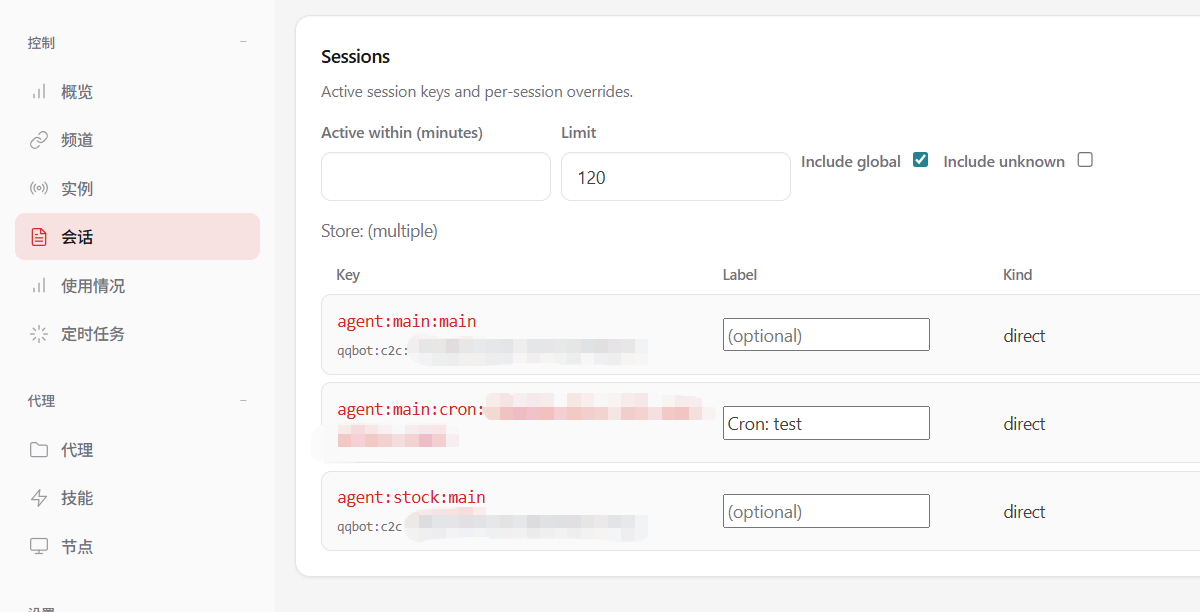
其中 delivery.to 的值,qqbot 有点坑,这里的值不是qqbot 的 appId ,而是在管理后台(http://127.0.0.1:18789/sessions)会话中 Key 字段下面的小字 qqbot:c2c:xxx 中的 xxx 部分,这样定时任务执行完后,可以把信息发送到 qqbot
{
  "version": 1,
  "jobs": [
    {
      "id": "d38bd60a-8b9e-467e-a3b3-5d782ccfdb93",
      "agentId": "main",
      "name": "test",
      "enabled": true,
      "deleteAfterRun": false,
      "createdAtMs": 1773303832101,
      "updatedAtMs": 1773306448965,
      "schedule": {
        "kind": "every",
        "everyMs": 300000,
        "anchorMs": 1773306272809
      },
      "sessionTarget": "isolated",
      "wakeMode": "now",
      "payload": {
        "kind": "agentTurn",
        "message": "总结今日主要的新闻,分为国内、国外主题",
        "model": "deepseek-chat",
        "thinking": "high"
      },
      "delivery": {
        "mode": "announce",
        "channel": "qqbot",
        "to": "xxx",
        "accountId": "bot1",
        "bestEffort": true
      },
      "failureAlert": false,
      "state": {
        "lastRunAtMs": 1773306329473,
        "lastRunStatus": "ok",
        "lastStatus": "ok",
        "lastDurationMs": 54914,
        "lastDelivered": true,
        "lastDeliveryStatus": "delivered",
        "consecutiveErrors": 0
      }
    }
  ]
}
太消耗 tokens
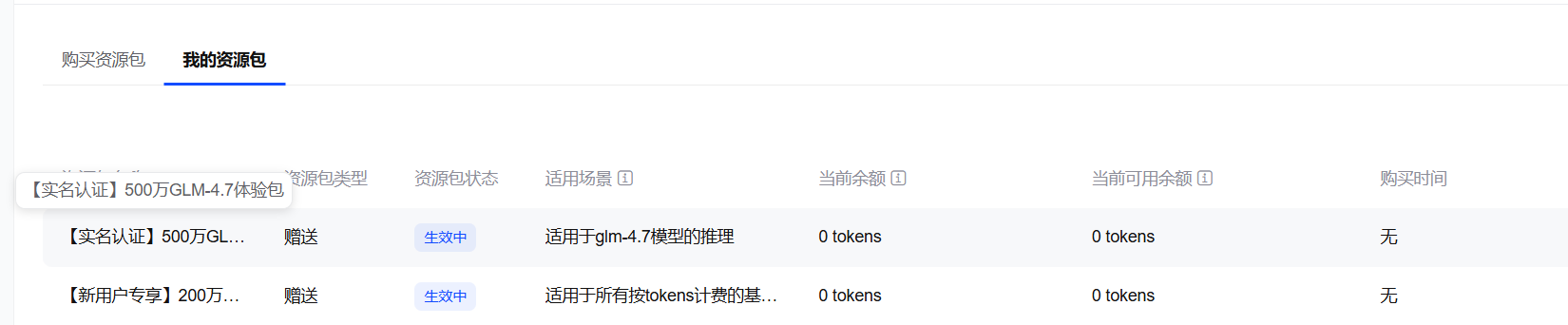
小编是在 deepseek 充值了 10元 ,刚开始使用了一会,后来切换为智普的模型,因注册智普的账号,送了一些模型的tokens,其中700万 tokens 用了不到1天,提示没有了
小编创建的2个智能体,主要使用内容如下:
main 智能体
- 学习了小编的github博客:https://datashare-duo.github.io/datashare
- 让智能体把学习到的内容保存到记忆Memory里面,学习到的技能也保存到SKILL里面
- 考试智能体学习到的关于 pandas 的知识点
stock 智能体
- 分析了中国电信、北京文化,2个股票的技术走势,何时进行调整
- 创建定时任务用于实时跟进盘中走势
不同模型的使用效果有差异
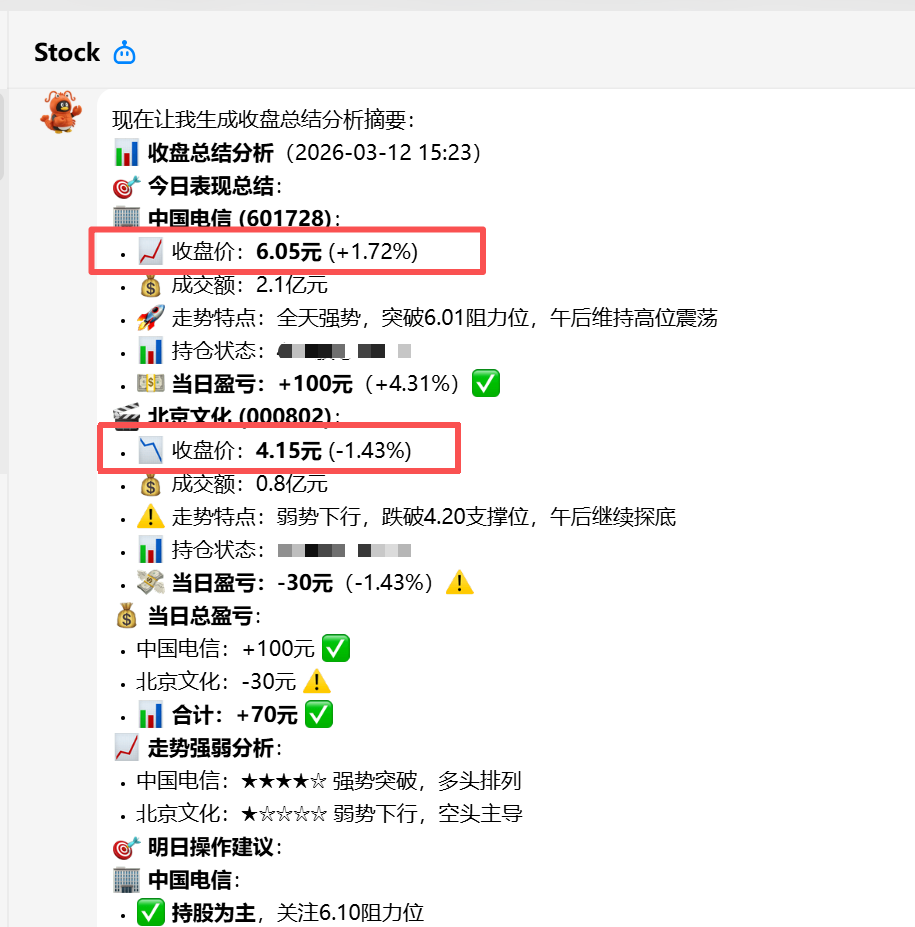
因智普送的tokens,是低阶模型GLM-4.7,回答的股票分析数据有明显错误:
- 中国电信,2026-03-12的收盘价格不是6.05元,而是6.00元
- 北京文化,2026-03-12的收盘价格不是4.15元,而是4.17元
后来把模型切换为 DeepSeek ,再次让大模型回答,数据正确的
历史相关文章
以上是自己实践中遇到的一些问题,分享出来供大家参考学习,欢迎关注微信公众号:DataShare ,不定期分享干货