
小编体验结论
- 配置有点复杂
- 太消耗 tokens
- 不同模型的使用效果有差异
下面分别就以上几点体验进行详细阐述,网上现在已经有大量的安装教程,小编这里不再赘述
小编环境
- Windows11
- WSL2 Ubuntu-24.04
- OpenClaw 官方安装,安装文档:https://docs.openclaw.ai/zh-CN/install
配置有点复杂
OpenClaw 大家可以把它当做一个 软件 或者 智能系统 使用,遇到什么问题,那大概率就是配置有问题
国内用户习惯界面UI开关按钮,进行软件控制,但OpenClaw有的配置界面配置太麻烦
配置可以从多个途径进行修改:
-
提供详细的提示词,让智能体自己去修改-----容易自己把自己修改废了
-
在 WebUI中修改配置,可以理解为管理后台-----在保存配置时,OpenClaw会备份之前的配置
-
命令行进行修改,命令有点复杂
-
直接修改配置文件-----修改完需要重启网关
小编这里是WSL2中安装的OpenClaw,对应的文件是
\\wsl.localhost\Ubuntu-24.04\home\datashare\.openclaw\openclaw.json
小编的一些配置,供大家参考:
模型配置
其中 DeepSeek 的模型,OpenClaw配置模型选项中没有,所以需要自己配置
小编体验了不同平台的模型,所以列出的模型配置有点多
"models": { "mode": "merge", "providers": { "deepseek": { "baseUrl": "https://api.deepseek.com/v1", "apiKey": "xxx", "api": "openai-completions", "models": [ { "id": "deepseek-chat", "name": "DeepSeek Chat (V3)" }, { "id": "deepseek-reasoner", "name": "DeepSeek Reasoner (R1)" } ] }, "bailian": { "baseUrl": "https://dashscope.aliyuncs.com/compatible-mode/v1", "apiKey": "xxx", "api": "openai-completions", "models": [ { "id": "qwen3.5-plus", "name": "qwen3.5-plus", "api": "openai-completions", "reasoning": false, "input": [ "text", "image" ], "cost": { "input": 0, "output": 0, "cacheRead": 0, "cacheWrite": 0 }, "contextWindow": 1000000, "maxTokens": 65536 }, { "id": "qwen3-max-2026-01-23", "name": "qwen3-max-2026-01-23", "api": "openai-completions", "reasoning": false, "input": [ "text" ], "cost": { "input": 0, "output": 0, "cacheRead": 0, "cacheWrite": 0 }, "contextWindow": 262144, "maxTokens": 65536 }, { "id": "qwen3-coder-next", "name": "qwen3-coder-next", "api": "openai-completions", "reasoning": false, "input": [ "text" ], "cost": { "input": 0, "output": 0, "cacheRead": 0, "cacheWrite": 0 }, "contextWindow": 262144, "maxTokens": 65536 }, { "id": "qwen3-coder-plus", "name": "qwen3-coder-plus", "api": "openai-completions", "reasoning": false, "input": [ "text" ], "cost": { "input": 0, "output": 0, "cacheRead": 0, "cacheWrite": 0 }, "contextWindow": 1000000, "maxTokens": 65536 }, { "id": "MiniMax-M2.5", "name": "MiniMax-M2.5", "api": "openai-completions", "reasoning": false, "input": [ "text" ], "cost": { "input": 0, "output": 0, "cacheRead": 0, "cacheWrite": 0 }, "contextWindow": 196608, "maxTokens": 32768 }, { "id": "glm-5", "name": "glm-5", "api": "openai-completions", "reasoning": false, "input": [ "text" ], "cost": { "input": 0, "output": 0, "cacheRead": 0, "cacheWrite": 0 }, "contextWindow": 202752, "maxTokens": 16384 }, { "id": "glm-4.7", "name": "glm-4.7", "api": "openai-completions", "reasoning": false, "input": [ "text" ], "cost": { "input": 0, "output": 0, "cacheRead": 0, "cacheWrite": 0 }, "contextWindow": 202752, "maxTokens": 16384 }, { "id": "kimi-k2.5", "name": "kimi-k2.5", "api": "openai-completions", "reasoning": false, "input": [ "text", "image" ], "cost": { "input": 0, "output": 0, "cacheRead": 0, "cacheWrite": 0 }, "contextWindow": 262144, "maxTokens": 32768 } ] }, "zai": { "baseUrl": "https://open.bigmodel.cn/api/paas/v4", "api": "openai-completions", "models": [ { "id": "glm-5", "name": "GLM-5", "reasoning": true, "input": [ "text" ], "cost": { "input": 0, "output": 0, "cacheRead": 0, "cacheWrite": 0 }, "contextWindow": 204800, "maxTokens": 131072 }, { "id": "glm-4.7", "name": "GLM-4.7", "reasoning": true, "input": [ "text" ], "cost": { "input": 0, "output": 0, "cacheRead": 0, "cacheWrite": 0 }, "contextWindow": 204800, "maxTokens": 131072 }, { "id": "glm-4.7-flash", "name": "GLM-4.7 Flash", "reasoning": true, "input": [ "text" ], "cost": { "input": 0, "output": 0, "cacheRead": 0, "cacheWrite": 0 }, "contextWindow": 204800, "maxTokens": 131072 }, { "id": "glm-4.7-flashx", "name": "GLM-4.7 FlashX", "reasoning": true, "input": [ "text" ], "cost": { "input": 0, "output": 0, "cacheRead": 0, "cacheWrite": 0 }, "contextWindow": 204800, "maxTokens": 131072 } ] } } }多智能体配置
默认安装完后是一个 main 智能体,然后小编这里又添加了一个 stock 智能体,这两个智能体是分开的,后期可以各自负责处理不同 主题/领域 的内容,类似垂类的概念
"agents": { "defaults": { "model": { "primary": "deepseek/deepseek-chat", "fallbacks": [ "bailian/glm-5", "bailian/glm-4.7", "bailian/kimi-k2.5", "deepseek/deepseek-reasoner", "qwen-portal/coder-model", "qwen-portal/vision-model", "bailian/qwen3.5-flash", "bailian/qwen3.5-plus", "bailian/qwen3-max-2026-01-23", "bailian/qwen3-coder-next", "bailian/qwen3-coder-plus", "bailian/MiniMax-M2.5" ] }, "models": { "deepseek/deepseek-chat": { "alias": "deepseek-v3" }, "deepseek/deepseek-reasoner": { "alias": "deepseek-r1" }, "qwen-portal/coder-model": { "alias": "qwen" }, "qwen-portal/vision-model": {}, "bailian/qwen3.5-flash": {}, "bailian/qwen3.5-plus": {}, "bailian/qwen3-max-2026-01-23": {}, "bailian/qwen3-coder-next": {}, "bailian/qwen3-coder-plus": {}, "bailian/MiniMax-M2.5": {}, "bailian/glm-5": {}, "bailian/glm-4.7": {}, "bailian/kimi-k2.5": {}, "zai/glm-4.7": { "alias": "GLM-4.7" }, "zai/glm-5": { "alias": "GLM" } }, "workspace": "/home/datashare/.openclaw/workspace", "compaction": { "mode": "safeguard", "reserveTokensFloor": 20000, "memoryFlush": { "enabled": true, "softThresholdTokens": 4000, "prompt": "Write any lasting notes to memory/YYYY-MM-DD.md; reply with NO_REPLY if nothing to store.", "systemPrompt": "Session nearing compaction. Store durable memories now." } }, "maxConcurrent": 4, "subagents": { "maxConcurrent": 8 } }, "list": [ { "id": "main" }, { "id": "stock", "name": "stock", "workspace": "/home/datashare/.openclaw/workspace-stock", "agentDir": "/home/datashare/.openclaw/agents/stock/agent", "model": "deepseek/deepseek-chat" } ] }消息渠道选择的是 qqbot
qqbot 注册地址:https://q.qq.com/qqbot/openclaw/login.html
"channels": { "qqbot": { "enabled": true, "accounts": { "bot1": { "enabled": true, "allowFrom": [ "*" ], "appId": "xxx", "clientSecret": "xxx" }, "bot2": { "enabled": true, "allowFrom": [ "*" ], "appId": "xxx", "clientSecret": "xxx" } } } }多智能体路由配置
main 智能体通过 bot1 进行通讯,stock 智能体通过 bot2 进行通讯
"bindings": [ { "agentId": "main", "match": { "channel": "qqbot", "accountId": "bot1" } }, { "agentId": "stock", "match": { "channel": "qqbot", "accountId": "bot2" } } ]定时任务配置
定时任务配置文件:\\wsl.localhost\Ubuntu-24.04\home\datashare\.openclaw\cron\jobs.json
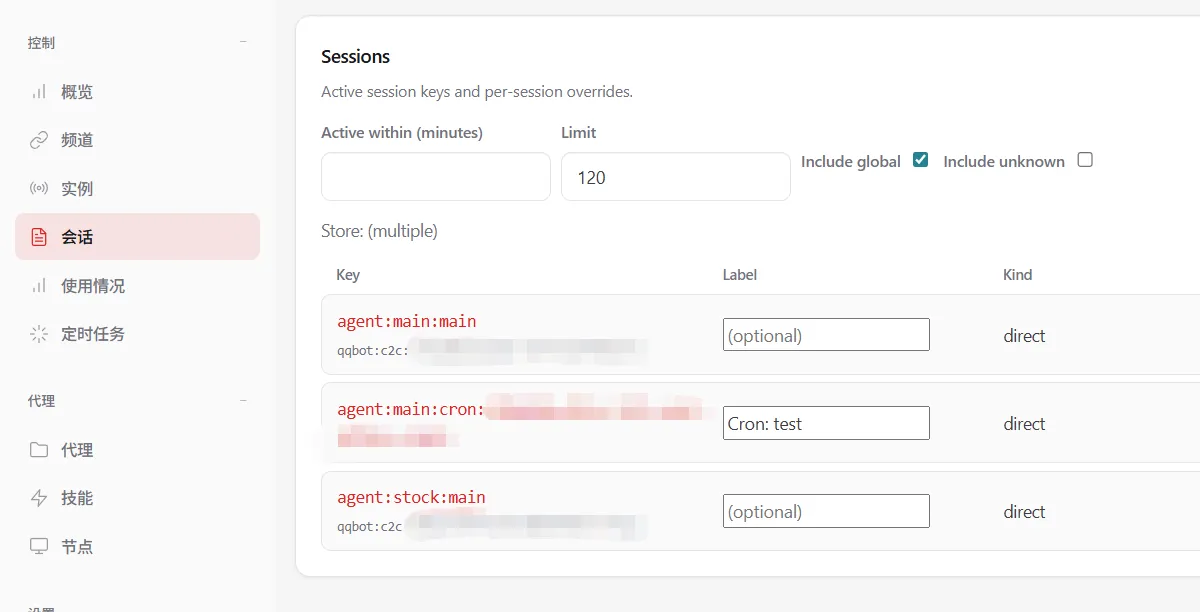
其中 delivery.to 的值,qqbot 有点坑,这里的值不是qqbot 的 appId ,而是在管理后台(http://127.0.0.1:18789/sessions)会话中 Key 字段下面的小字 qqbot:c2c:xxx 中的 xxx 部分,这样定时任务执行完后,可以把信息发送到 qqbot
{ "version": 1, "jobs": [ { "id": "d38bd60a-8b9e-467e-a3b3-5d782ccfdb93", "agentId": "main", "name": "test", "enabled": true, "deleteAfterRun": false, "createdAtMs": 1773303832101, "updatedAtMs": 1773306448965, "schedule": { "kind": "every", "everyMs": 300000, "anchorMs": 1773306272809 }, "sessionTarget": "isolated", "wakeMode": "now", "payload": { "kind": "agentTurn", "message": "总结今日主要的新闻,分为国内、国外主题", "model": "deepseek-chat", "thinking": "high" }, "delivery": { "mode": "announce", "channel": "qqbot", "to": "xxx", "accountId": "bot1", "bestEffort": true }, "failureAlert": false, "state": { "lastRunAtMs": 1773306329473, "lastRunStatus": "ok", "lastStatus": "ok", "lastDurationMs": 54914, "lastDelivered": true, "lastDeliveryStatus": "delivered", "consecutiveErrors": 0 } } ]}太消耗 tokens
小编是在 deepseek 充值了 10元 ,刚开始使用了一会,后来切换为智普的模型,因注册智普的账号,送了一些模型的tokens,其中700万 tokens 用了不到1天,提示没有了
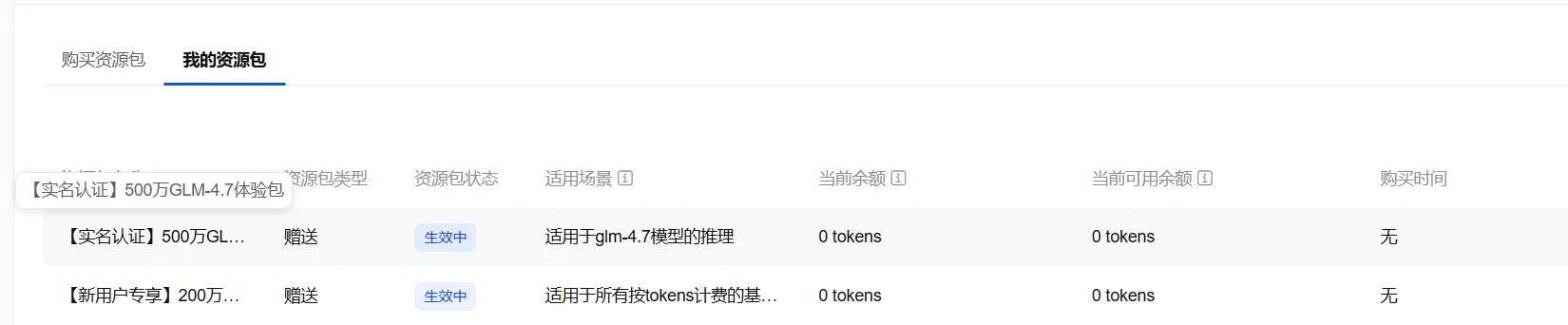
小编创建的2个智能体,主要使用内容如下:
main 智能体
- 学习了小编的github博客:https://datashare-duo.github.io/datashare
- 让智能体把学习到的内容保存到记忆Memory里面,学习到的技能也保存到SKILL里面
- 考试智能体学习到的关于 pandas 的知识点
stock 智能体
- 分析了中国电信、北京文化,2个股票的技术走势,何时进行调整
- 创建定时任务用于实时跟进盘中走势
不同模型的使用效果有差异
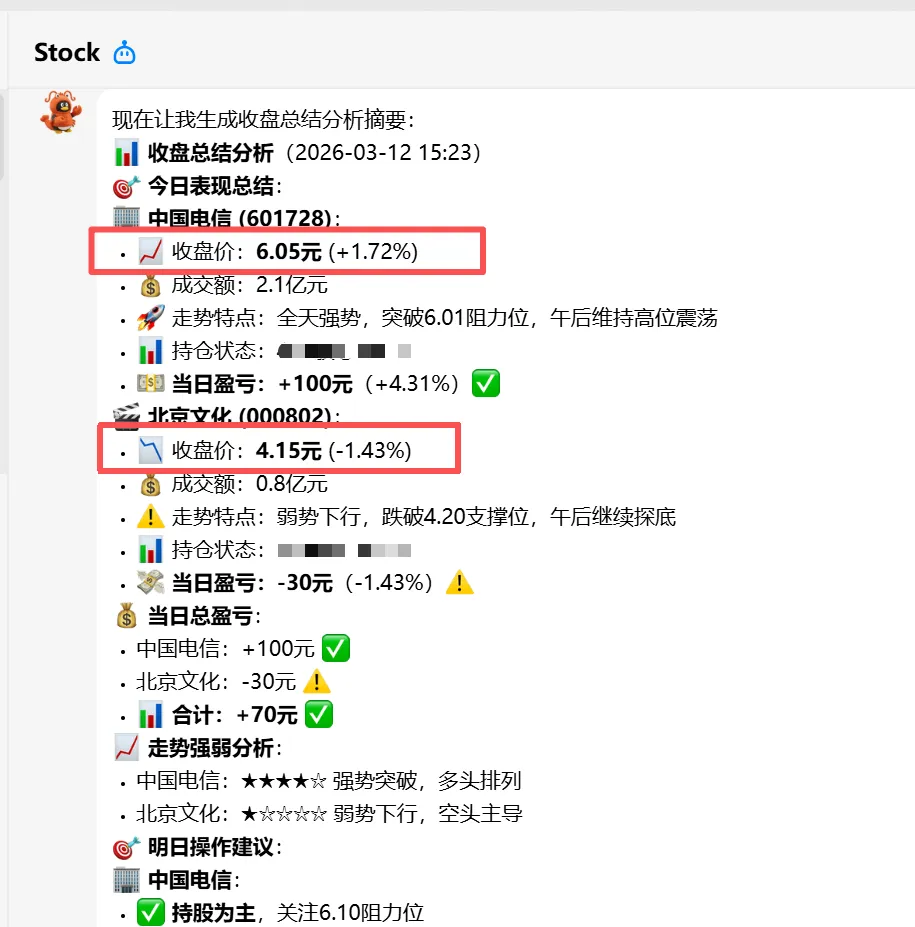
因智普送的tokens,是低阶模型GLM-4.7,回答的股票分析数据有明显错误:
- 中国电信,2026-03-12的收盘价格不是6.05元,而是6.00元
- 北京文化,2026-03-12的收盘价格不是4.15元,而是4.17元
后来把模型切换为 DeepSeek ,再次让大模型回答,数据正确的
历史相关文章
以上是自己实践中遇到的一些问题,分享出来供大家参考学习,欢迎关注微信公众号:DataShare ,不定期分享干货